

Why you’re here
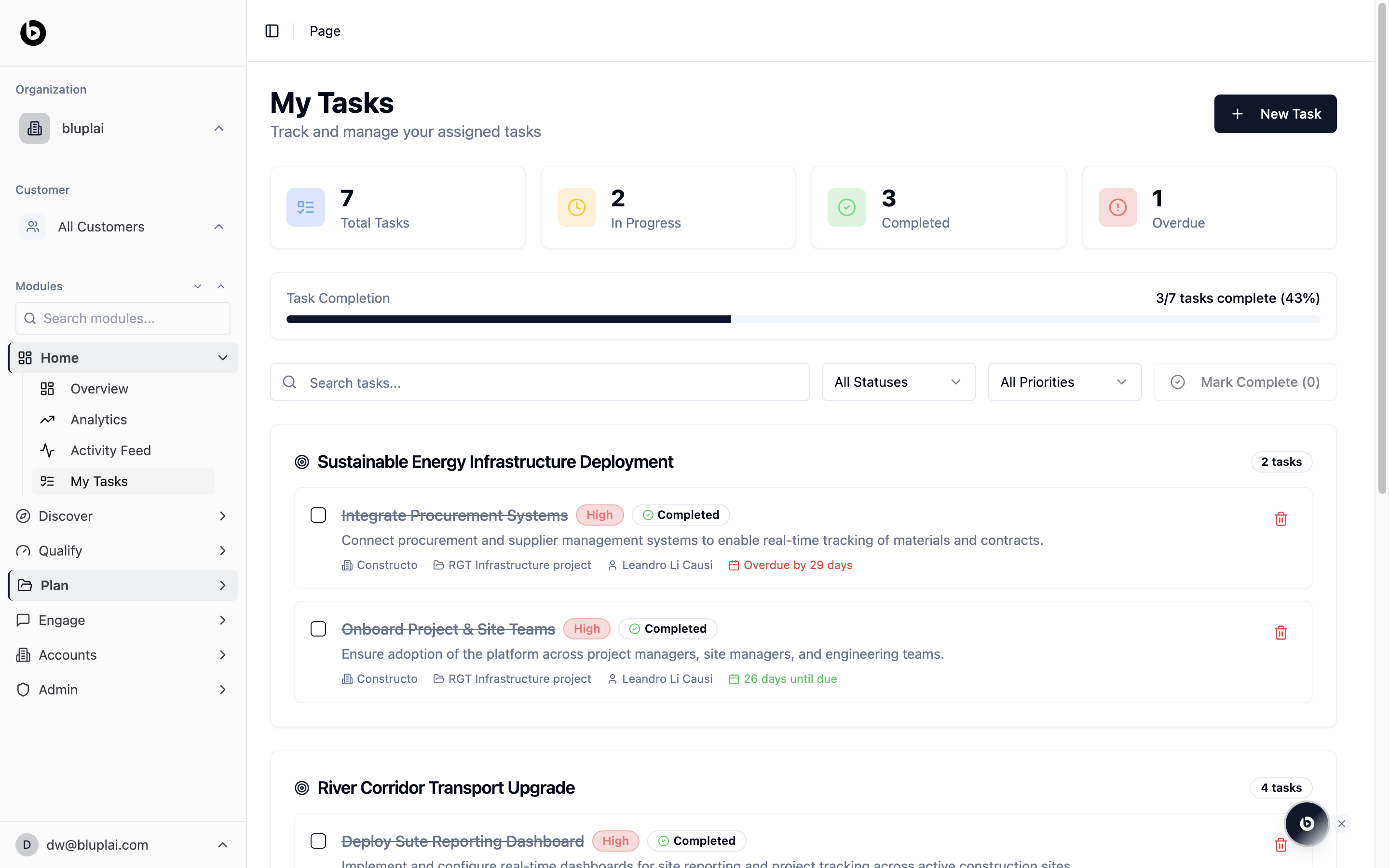
My Tasks under Home is the “what do I owe this week?” view. It’s the same page as Plan → Tasks, but framed for the individual contributor rather than the project lead — the focus is your personal work across every account, not one project’s task backlog. Open it first thing in the morning, after a customer call that generated new action items, or when you’re triaging before the weekend.What you’ll see
- Four counters at the top: Total Tasks, In Progress, Completed, and Overdue.
- A Task Completion progress bar showing how many tasks are done out of the total, with a percentage.
- A search box and two dropdowns (All Statuses, All Priorities), plus a Mark Complete action that counts selected items.
- Tasks grouped under their parent project heading with a per-project count on the right.
- Each task row shows a checkbox, title, priority pill, status pill, description, the account it belongs to, the source project, the assignee, and a due-date indicator — overdue items show the day count in red.
- A New Task button in the top right.
When to use it
- Start the week with one list of everything you owe across every account.
- Clear overdue work before a status call instead of hunting across projects.
- Bulk-complete a batch of items after a working session with the Mark Complete action.
- Jump from a task into its parent project to open the Customer Success Plan in context.
Next
Activity feed
See the log of changes your completed tasks generated.
Overview
Return to the portfolio dashboard for context across accounts.