

Why you’re here
Analytics is where you stop counting and start judging. It turns the portfolio into a health view — who’s healthy, who’s drifting, and who’s already at risk. Open it when you need to prepare a pipeline review, pick the next save play, or answer the question “which three accounts matter most this week?”What you’ll see
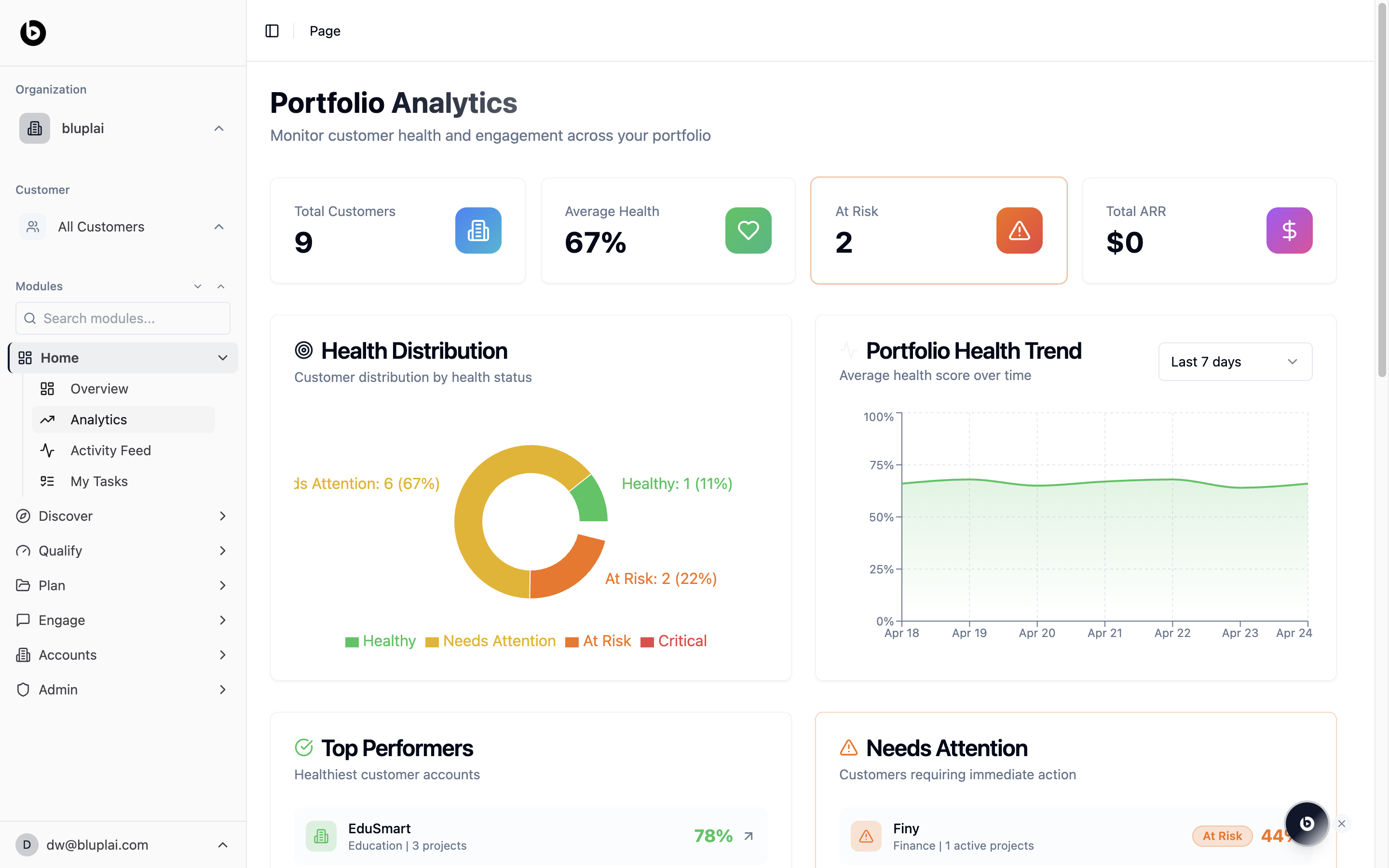
- Four summary tiles: Total accounts, Average Health (as a percentage), At Risk (count), and Total ARR.
- A Health Distribution donut breaking the portfolio into Healthy, Needs Attention, At Risk, and Critical, each with a count and share of total.
- A Portfolio Health Trend line charting the average health score over time, with a Last 7 days selector.
- A Top Performers panel listing the healthiest accounts with their industry, active project count, and health percentage.
- A Needs Attention panel listing accounts requiring immediate action, tagged At Risk with a health score.
Health scores are a composite signal — engagement activity, survey responses, initiative progress, and overdue work all feed the number. An account that drops into Needs Attention isn’t automatically a churn risk, but it’s the first place to look.
How it’s calculated
Today the Health Score shown in the UI is a rolling 12-month view of account health, bucketed into Healthy, Needs Attention, At Risk, and Critical. The weighted formula below is defined but not yet live:- Token utilisation — how actively the account’s licensed seats are used.
- Adoption breadth — how many modules they touch.
- Velocity — rate of meaningful activity (actions closed, milestones moved).
Phase 1 (current): the 12-month view is what the page shows today. Phase 2: the weighted formula above rolls out later and will drive the same Healthy / Needs Attention / At Risk / Critical thresholds.
When to use it
- Plan your save calls for the week by starting with the Needs Attention list.
- Benchmark a single account’s health against the portfolio average.
- Spot a downward trend on the health line before it shows up in renewal conversations.
- Pull the Total ARR and At Risk numbers for an exec-level rollup.
Next
Overview
Go back to the top-level portfolio dashboard.
Activity feed
See the recent changes driving these health scores.