> ## Documentation Index
> Fetch the complete documentation index at: https://docs.bluplai.com/llms.txt
> Use this file to discover all available pages before exploring further.
# Value drivers
> Link industry drivers to the outcomes you plan to deliver, so the business case is anchored in motivation — not slides.
 ## Why you're here
Qualify is where insights turn into business value and alignment, and value drivers are the foundation. Instead of bullet points in a deck, you capture the business motivations that justify investment and tie each one to the outcomes the customer expects. In a working session you can build a simple ROI view together with the customer and align business and technical stakeholders around a shared vision — outcomes connected to architecture and capabilities — without switching between Excel and slides. That saves 1–2 hours per opportunity on business case prep and leads to better decisions with a shared value view. Every other tab in Qualify hangs off the drivers you set here.
*Value is clarified early, not reconstructed later.*
## What you'll see
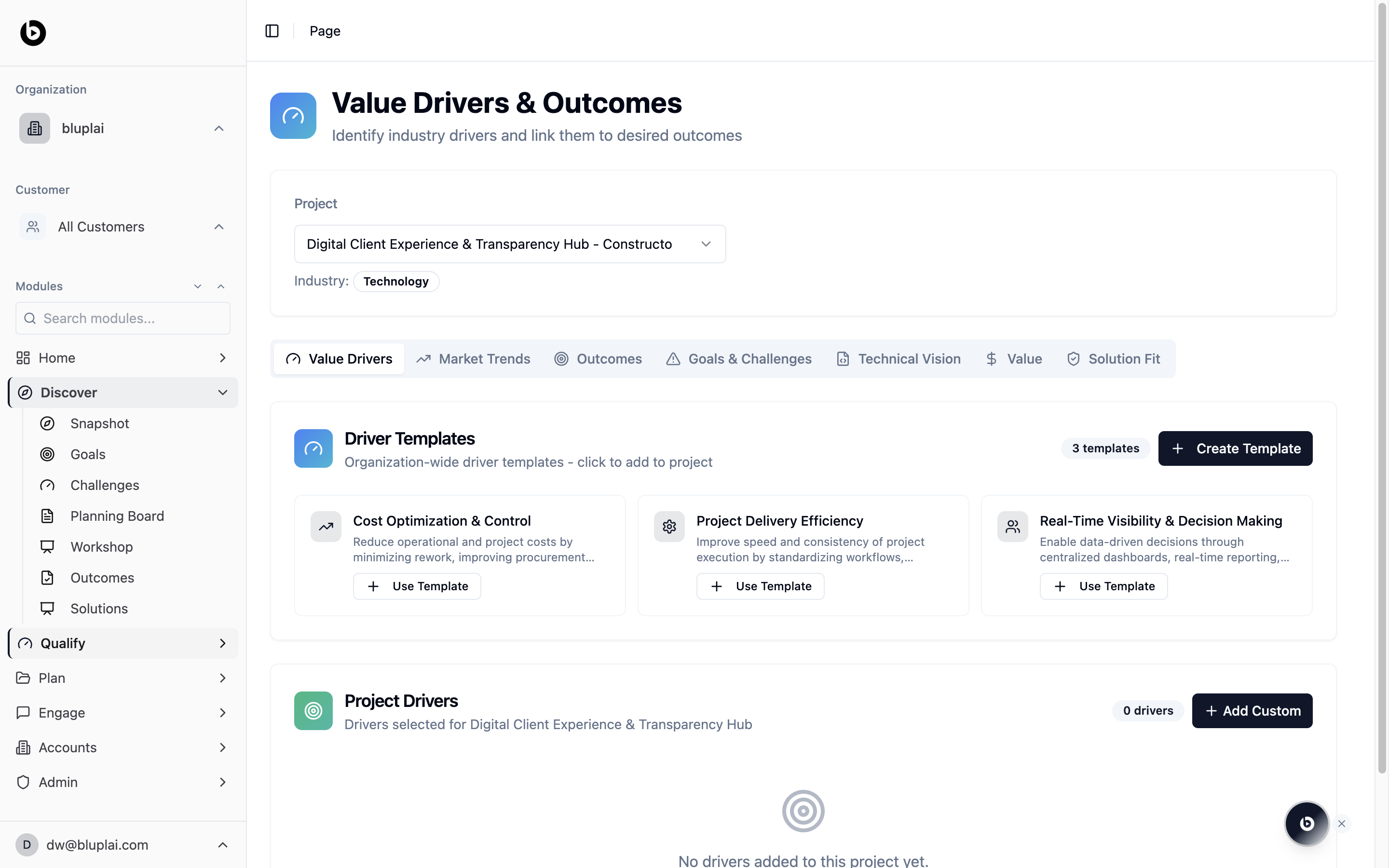
The page opens on the **Value Drivers** tab with the current project and industry selected at the top. You'll find two sections:
* **Driver templates** — organization-wide starting points (for example, "Cost Optimization & Control", "Project Delivery Efficiency", "Real-Time Visibility & Decision Making"). Click **Use Template** to add one to the project, or **Create Template** to build a reusable driver for your org.
* **Project drivers** — the shortlist of drivers you've selected for this project. On a new project this shows "No drivers added to this project yet." Use **Add Custom** to add a one-off driver that isn't in the template library.
Across the top you can jump to sibling tabs: Market Trends, Outcomes, Goals & Challenges, Technical Vision, Value, and Solution Fit.
## When to use it
* Kicking off a new opportunity and framing the business case
* Before a discovery call, so you know which drivers to confirm with the customer
* Standardising how your team qualifies accounts — templates enforce a shared vocabulary
* When a driver changes mid-cycle and the plan needs to follow
## Next
Capture the industry forces shaping this deal.
Turn drivers into measurable results you'll deliver.
## Why you're here
Qualify is where insights turn into business value and alignment, and value drivers are the foundation. Instead of bullet points in a deck, you capture the business motivations that justify investment and tie each one to the outcomes the customer expects. In a working session you can build a simple ROI view together with the customer and align business and technical stakeholders around a shared vision — outcomes connected to architecture and capabilities — without switching between Excel and slides. That saves 1–2 hours per opportunity on business case prep and leads to better decisions with a shared value view. Every other tab in Qualify hangs off the drivers you set here.
*Value is clarified early, not reconstructed later.*
## What you'll see
The page opens on the **Value Drivers** tab with the current project and industry selected at the top. You'll find two sections:
* **Driver templates** — organization-wide starting points (for example, "Cost Optimization & Control", "Project Delivery Efficiency", "Real-Time Visibility & Decision Making"). Click **Use Template** to add one to the project, or **Create Template** to build a reusable driver for your org.
* **Project drivers** — the shortlist of drivers you've selected for this project. On a new project this shows "No drivers added to this project yet." Use **Add Custom** to add a one-off driver that isn't in the template library.
Across the top you can jump to sibling tabs: Market Trends, Outcomes, Goals & Challenges, Technical Vision, Value, and Solution Fit.
## When to use it
* Kicking off a new opportunity and framing the business case
* Before a discovery call, so you know which drivers to confirm with the customer
* Standardising how your team qualifies accounts — templates enforce a shared vocabulary
* When a driver changes mid-cycle and the plan needs to follow
## Next
Capture the industry forces shaping this deal.
Turn drivers into measurable results you'll deliver.