> ## Documentation Index
> Fetch the complete documentation index at: https://docs.bluplai.com/llms.txt
> Use this file to discover all available pages before exploring further.
# Templates
> Pre-built frameworks and playbooks your team can reuse across accounts — discovery, execution, and reporting.
 ## Why you're here
Every team ends up with a few frameworks they rely on — a discovery script, a stakeholder map, a QBR structure, an onboarding checklist. Templates is where those live so they're one click away for everyone, instead of buried in someone's docs.
## What you'll see
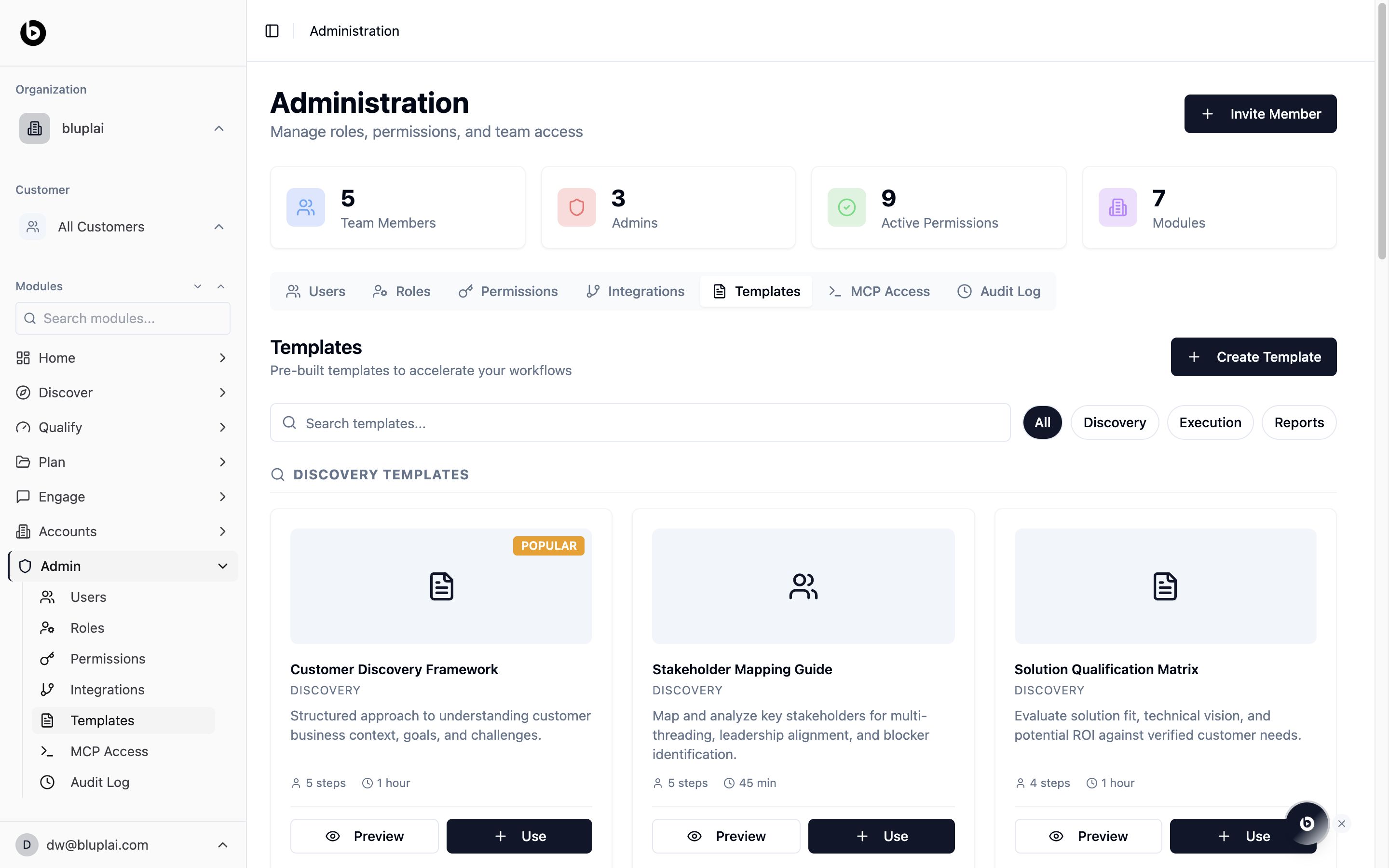
A library of template cards grouped by category. Each card shows a title, category (Discovery, Execution, Reports), a short description, and a footer with step count and estimated duration. Popular templates carry a badge.
Filter the library with the category buttons on the right — **All**, **Discovery**, **Execution**, **Reports** — or search by name. Every card has two actions:
* **Preview** — open the template to see the steps before you apply it
* **Use** — apply the template into your workspace
Templates today are **pre-built** and seeded by Bluplai. The **Create Template** button appears in the UI but isn't wired up yet — you can **Preview** and **Use** existing templates, and authoring your own will arrive in a later release.
## When to use it
* You're running a discovery call and want the same structure your whole team uses
* You're preparing a QBR and want the report scaffolding already filled in
* A new CSM needs an onboarding playbook on day one
* You're evaluating a deal and want a pre-built qualification matrix
## Using a template
Filter by category or search by name.
Click **Preview** on the card to see the steps, structure, and what it will produce before you commit.
Click **Use** to apply the template. It scaffolds the associated structure into the relevant module (for example, a discovery template sets up Discover sections; a reporting template seeds a deliverable).
## Next
Make sure the right people can apply templates across modules.
Track when templates are applied across the workspace.
## Why you're here
Every team ends up with a few frameworks they rely on — a discovery script, a stakeholder map, a QBR structure, an onboarding checklist. Templates is where those live so they're one click away for everyone, instead of buried in someone's docs.
## What you'll see
A library of template cards grouped by category. Each card shows a title, category (Discovery, Execution, Reports), a short description, and a footer with step count and estimated duration. Popular templates carry a badge.
Filter the library with the category buttons on the right — **All**, **Discovery**, **Execution**, **Reports** — or search by name. Every card has two actions:
* **Preview** — open the template to see the steps before you apply it
* **Use** — apply the template into your workspace
Templates today are **pre-built** and seeded by Bluplai. The **Create Template** button appears in the UI but isn't wired up yet — you can **Preview** and **Use** existing templates, and authoring your own will arrive in a later release.
## When to use it
* You're running a discovery call and want the same structure your whole team uses
* You're preparing a QBR and want the report scaffolding already filled in
* A new CSM needs an onboarding playbook on day one
* You're evaluating a deal and want a pre-built qualification matrix
## Using a template
Filter by category or search by name.
Click **Preview** on the card to see the steps, structure, and what it will produce before you commit.
Click **Use** to apply the template. It scaffolds the associated structure into the relevant module (for example, a discovery template sets up Discover sections; a reporting template seeds a deliverable).
## Next
Make sure the right people can apply templates across modules.
Track when templates are applied across the workspace.